





For years, AI coding tools did one thing well: they finished your sentence. You started typing a function, and the tool guessed the rest. Helpful, but limited—like a calculator that only worked when you already knew the answer.
That era is over. The new generation of AI coding tools doesn’t just suggest code. It acts on a goal. You describe what you want, and the tool plans the work, writes the code across multiple files, runs the tests, fixes its own mistakes, and hands you something ready to review. This is agentic coding, and it’s quietly reshaping how software gets built.
Let’s break down what it actually means—starting simple, then going deeper.
The Simple Version: From Autocomplete to Autopilot
Imagine the difference between a spell-checker and a personal assistant.
A spell-checker reacts. It waits for you to type, then offers a correction. That’s traditional AI autocomplete—useful, but it never leaves the passenger seat.
A personal assistant is different. You say, “Book me a flight to Lisbon next Friday under €300,” and they go figure out the steps: search options, compare prices, handle the booking, and come back when it’s done or when they hit a snag. You set the goal; they handle the execution.
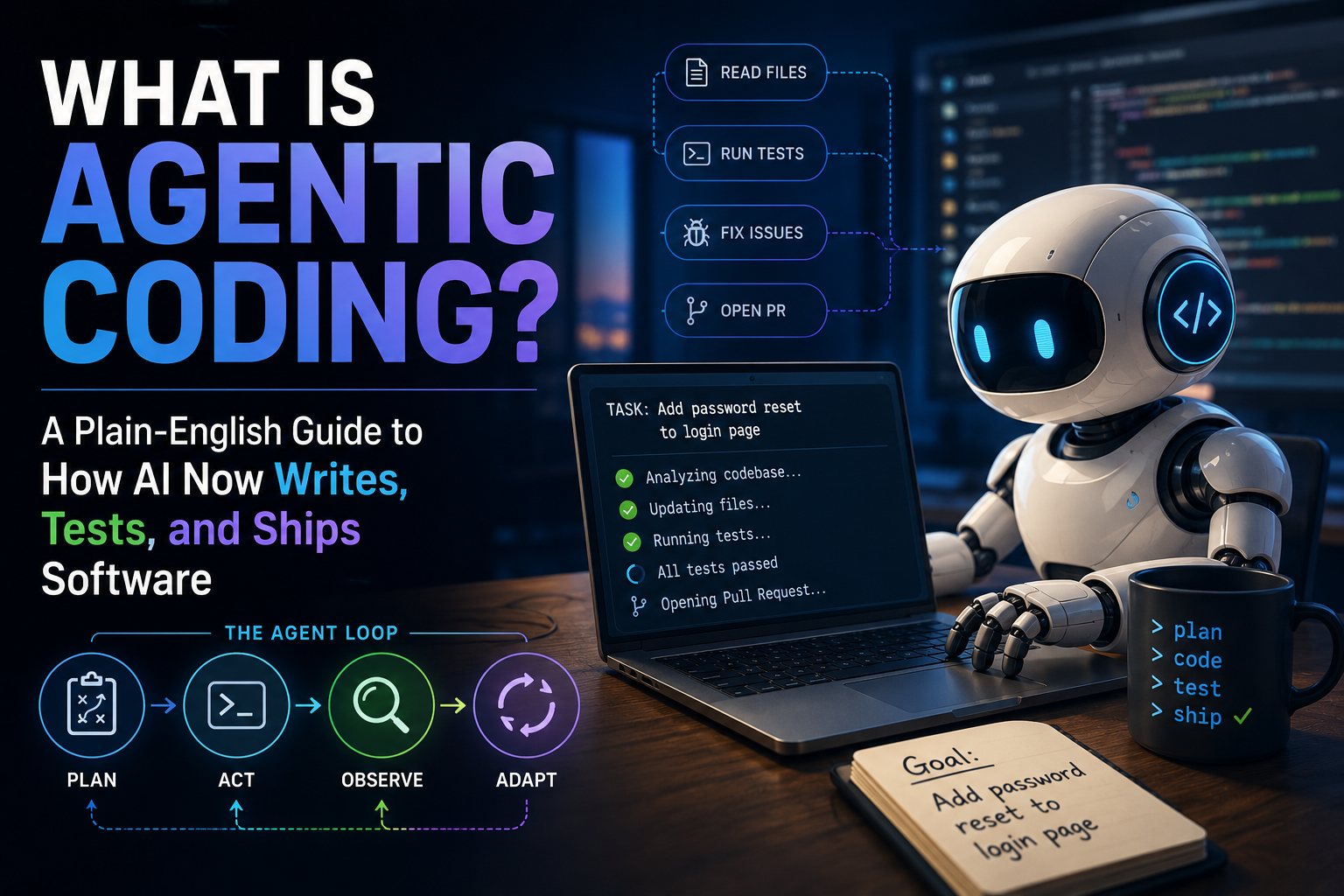
Agentic coding is the personal-assistant version of programming. Instead of nudging your cursor line by line, an AI agent takes a real task—”add password reset to our login page”—and works through it semi-autonomously: reading the relevant files, writing the new code, running tests, and iterating until it works.
The industry shorthand captures it well: the line between autocomplete and agentic coding is whether the tool can read a ticket, open the right files, write the implementation, run the tests, and open a pull request while you’re in a meeting.
What Makes Coding “Agentic”?
An AI becomes an “agent” when it can do four things on its own, in a loop:
- Plan — Break a vague goal into concrete steps.
- Act — Use tools like a terminal, file editor, or web browser to carry out those steps.
- Observe — Check the results (Did the test pass? Did the code compile?).
- Adapt — Fix errors and try again without waiting for you to point them out.
This loop is the heart of it. A traditional assistant gives you one answer and stops. An agent keeps cycling—act, check, correct—until the job is genuinely finished or it decides it needs your input.
That last part matters. Good agents know when to ask for help. They’ll flag ambiguous requirements or pause before high-stakes moves like deploying to production, handing the decision back to you.
A quick analogy
Think of a junior developer on their first week. You don’t dictate every keystroke. You say, “Fix this bug,” and they go read the codebase, make changes, run the tests, and come back with a fix for you to review. Sometimes they get stuck and ask a question. Agentic coding tools are aiming to be that capable junior developer—one who works fast, never sleeps, and can run several tasks at once.
A Real-World Walkthrough
Here’s roughly what happens when you hand a modern coding agent a task like “Users are complaining the search bar is case-sensitive. Make it case-insensitive.”
- Understand — The agent searches your codebase to find where search is handled.
- Plan — It identifies the function comparing search terms and decides what to change.
- Edit — It modifies the code, possibly across several files (the search logic, plus a test).
- Verify — It runs the existing test suite to confirm nothing broke.
- Report — It summarizes what it changed and why, then opens a pull request for you to approve.
You never opened the file. You described a problem in plain language, and a reviewable solution came back. Your job shifted from typing the fix to checking that the fix is right.
The Three Flavors of Agentic Coding Tools
The 2026 landscape has split into a few distinct styles, each suited to a different way of working.
| Type | Where it lives | Best for |
|---|---|---|
| IDE-based agents | Inside your code editor | Developers who want AI woven into their existing workflow |
| CLI agents | In your terminal | Power users, scripting, and large-scale codebase work |
| Background agents | Run asynchronously in the cloud | Delegating tasks while you focus elsewhere |
A few names you’ll hear most often:
- Claude Code (Anthropic) — A terminal-native agent known for strong reasoning, large-codebase navigation, and complex refactors.
- Cursor — A popular AI-first editor built on the familiar VS Code interface.
- GitHub Copilot — Evolved from autocomplete into an agent that understands repositories and makes coordinated changes.
- OpenAI Codex — Ships through ChatGPT and a CLI, strong on parallelized, terminal-driven work.
- Windsurf, Devin, and others — A fast-growing crowd of specialized and general-purpose agents.
The bigger point isn’t any single tool—it’s that this category exploded from a handful of experiments into a full ecosystem in barely two years.
What This Looks Like in Practice
To make it concrete, here are two of the most widely used tools—one from each end of the spectrum.
Claude Code (a terminal agent). You run it from your command line, point it at a project, and describe a task in plain English. It reads across the whole codebase, edits files, runs tests, and reports back. A simplified session might look like this:
$ claude
> The search bar is case-sensitive. Make it case-insensitive and add a test.

● Searched codebase, found search logic in src/search.js
● Edited src/search.js (lowercased both sides of the comparison)
● Added test in tests/search.test.js
● Ran test suite — 14 passed
● Done. Want me to open a pull request?
You never opened a file. Its standout trait is a very large context window, which lets it hold an entire codebase in view at once—handy for big refactors and migrations. Access is bundled into Claude’s subscriptions, starting at $20/month.
Cursor (an IDE agent). Cursor is an AI-first editor built on the familiar VS Code interface, so it feels like the editor most developers already know—just with an agent living inside it. You describe a goal in a side panel, and the agent plans and executes multi-file changes right in your editor, where you approve or tweak as it goes. It also lets you swap between underlying models (Claude, GPT, Gemini) depending on the task, and offers a free tier plus paid plans from $20/month.
The simplest way to frame the choice: Cursor is the better AI editor, while Claude Code is the better terminal-first agent. That said, the old “terminal vs IDE” line is blurring fast—Cursor now ships a command-line tool, and Claude Code runs inside VS Code too.
Are These Tools Actually Any Good?
Reasonable skepticism is healthy. The honest answer: they’ve improved at a startling pace, but they’re not magic.
The standard yardstick is a benchmark called SWE-bench Verified, which tests whether an agent can resolve real, documented bugs pulled from open-source projects—not toy puzzles, but actual GitHub issues with real test suites. As one explainer puts it, this measures whether a model can operate inside a real project, which is far harder than writing a single correct function in isolation.
The progress is the headline. On this benchmark, agent success rates have climbed from under 10% to over 70% in about a year, with the leading systems in 2026 now clearing the 80% mark on the most-cited version. Newer, tougher benchmarks like SWE-bench Pro—built partly from private codebases the models couldn’t have trained on—deliberately keep scores lower (the best sit closer to the 55–60% range) to prevent the tests from being gamed.
The takeaway: agents now solve a large share of well-defined, real-world coding tasks on their own. They still struggle with vague requirements, sprawling architecture decisions, and anything needing deep context they weren’t given. Numbers vary by source and change monthly, so treat any specific score as a snapshot, not gospel.
Why This Matters Right Now
Agentic coding isn’t a lab curiosity. It’s moving into how real teams ship software.
- The developer’s role is changing. The job is shifting from writing every line toward orchestrating AI agents—providing direction, architectural guidance, and final approval. Less typing, more reviewing and steering.
- Speed compounds. When an agent can run tests and fix its own bugs in a loop, routine tasks that once took an afternoon can collapse into minutes.
- Asynchronous work is the new frontier. The most interesting 2026 shift is moving from sitting beside an AI to delegating to it—kicking off a task and walking away while it works in the background.
- Standards are emerging. Protocols like Anthropic’s Model Context Protocol (MCP) are becoming a common language that lets agents securely connect to your tools, files, and data—the plumbing that makes all this practical at scale.
For non-developers, the implication is just as big. The barrier between “I have an idea for an app” and “here’s a working prototype” keeps getting thinner.
The Honest Caveats
A few things worth keeping in mind before you hand over the keys:
- Review everything. An agent’s code can look confident and still be wrong. Human oversight isn’t optional—it’s the whole point of the “approve the pull request” step.
- Bounded autonomy beats full autonomy. The teams succeeding with these tools set clear limits: what an agent can touch, when it must ask permission, and a trail of what it did. Most organizations are not letting agents run unsupervised.
- Security and access matter. An agent with access to your systems is powerful and risky in equal measure. Treat its permissions the way you’d treat a new employee’s.
- It won’t replace understanding. Knowing why code works still matters. Agents are leverage for people who understand the problem, not a substitute for understanding it.
Getting Started
You don’t need to overhaul your workflow to try this. A reasonable on-ramp:
- Pick one tool that fits where you already work—an IDE agent if you live in an editor, a CLI agent if you’re comfortable in the terminal.
- Start with a small, well-defined task—a bug fix or a tiny feature—where you can easily check the result.
- Read every change it makes. Treat the output as a draft from a fast junior teammate.
- Scale up slowly as you learn what it’s good at and where it needs guardrails.
The skill that matters most isn’t prompting tricks. It’s writing clear, specific goals and reviewing critically—the same skills that make a good engineering manager.
Key Takeaways
- Agentic coding means AI that doesn’t just suggest code but plans, writes, tests, and fixes it in an autonomous loop—autopilot, not autocomplete.
- The four building blocks of any agent are plan, act, observe, and adapt, with good agents pausing to ask when stakes are high.
- Tools come in three flavors: IDE-based, CLI, and background agents, with names like Claude Code, Cursor, Copilot, and Codex leading in 2026.
- On real-world benchmarks, success rates have leapt from under 10% to over 70% in about a year—with the 2026 leaders now clearing 80%—impressive, but far from flawless.
- The developer’s role is shifting from coder to orchestrator: less typing, more directing and reviewing.
- Human oversight, bounded autonomy, and security remain essential. These tools are powerful leverage, not a hands-off replacement for judgment.
The bottom line: agentic coding is turning software development into a conversation about goals rather than a grind of keystrokes. The developers who thrive won’t be the ones who type fastest—they’ll be the ones who direct these agents most clearly.
Sources
- Webfuse — Agentic Coding in 2026
- Tembo — Best Agentic AI Coding Tools in 2026: Compared
- Akoode — Top Agentic AI Coding Tools 2026
- Datalakehouse Hub — The Complete Guide to Agentic Coding Tools in 2026
- Agentic.ai — 18 Best AI Coding Agents in 2026
- Prommer.net — Agentic Coding Tools for Enterprise: Deployment Guide (2026)
- LLM-Stats — SWE-bench Verified (Agentic Coding) Leaderboard)
- DemandSphere — SWE-bench Verified Explained / Frontier Model Tracker
- CodeAnt — SWE-bench Leaderboard 2026: Scores, Rankings & What They Mean
- Morphllm — Best AI Model for Coding (June 2026)
- Morphllm — SWE-bench Pro Leaderboard (2026)
- Epoch AI — SWE-bench Verified (methodology & versioning)
- arXiv — FeatureBench: Benchmarking Agentic Coding for Complex Feature Development
- Builder.io — Claude Code vs Cursor: What to Choose in 2026
- Spectrum AI Lab — Claude Code vs Cursor Pricing: Pro, Max, Ultra 2026
- ClaudeFast — Claude Code vs Cursor 2026: Features, Pricing Compared
- AI Productivity — Claude Code Pricing 2026: Plans and Costs
- Morphllm — Claude Code Pricing (2026): Plans + API Costs